Choose servers based on which CA signed your client certificate:
- RSA CA → Ports 8443, 8448
- ECDSA CA → Port 8445
- ML-DSA-44 CA → Ports 8444, 8446, 8447, 8449
- ML-DSA-65 CA → Port 8450
- ML-DSA-87 CA → Port 8451
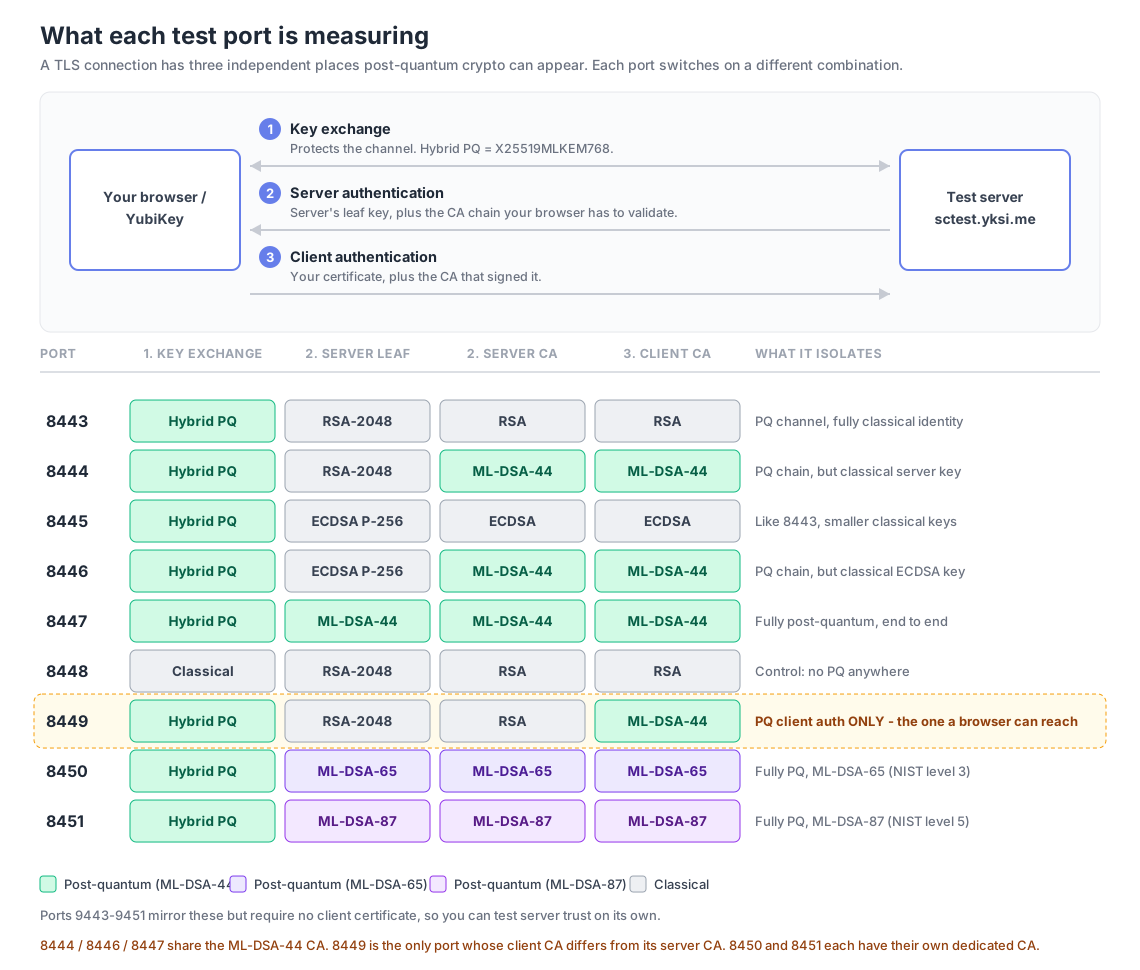
🗺️ What is each port actually testing?
Every port runs the same protocol; they differ only in where the post-quantum algorithms sit. Green cells are post-quantum, grey are classical.
- Verify return code: 0 (ok) - Certificate verified successfully
- Client certificate subject - Your name from the certificate CN
- Cipher suite - Shows if Hybrid PQ or Classical key exchange was used
- Server statistics - Connection details from OpenSSL
🖥️ Testing with a soft certificate from the command line
If your certificate is a file on disk rather than on a YubiKey, or your browser
has no ML-DSA support yet, you can drive the same tests with
openssl s_client. You need OpenSSL 3.5 or later
for the ML-DSA cases — check with openssl version.
Certificates from the Get Certificate page are named
<name>-<keytype>-ca-<catype>, so the filename tells
you which port it works against:
# A cert signed by the ML-DSA CA, tested against port 8447
openssl s_client -connect sctest.yksi.me:8447 -brief \
  -cert erikalpha8-mldsa-ca-mldsa.crt \
  -key  erikalpha8-mldsa-ca-mldsa.key \
  -CAfile YK-ML-DSA-44-Root-CA.crt </dev/null
Use -CAfile YK-RSA-Root-CA.crt for ports 8443/8448,
YK-ECDSA-Root-CA.crt for 8445,
YK-ML-DSA-44-Root-CA.crt for 8444/8446/8447,
YK-ML-DSA-65-Root-CA.crt for 8450, and
YK-ML-DSA-87-Root-CA.crt for 8451.
Port 8449 is the exception: its server chain is RSA while its client CA is
ML-DSA-44, so it takes -CAfile YK-RSA-Root-CA.crt together with an
ML-DSA-44-CA-signed client certificate.
A successful handshake prints Verification: OK and,
on the hybrid ports, Negotiated TLS1.3 group: X25519MLKEM768.
One caveat with s_client: under TLS 1.3 it reports the connection
as established before the server has finished checking your certificate. If you
run it with </dev/null a rejected certificate still looks like a
success. Send a request through the connection —
printf 'GET / HTTP/1.0\r\n\r\n' | openssl s_client ... -ign_eof
— so the server's alert actually comes back.
Two scripts automate the whole matrix. Download both into an empty directory:
curl -O https://sctest.yksi.me/make-soft-certs.sh
curl -O https://sctest.yksi.me/test-soft-certs.sh
chmod +x *.sh

./make-soft-certs.sh <your-name>     # 25 key/cert pairs + the 5 root CAs
./test-soft-certs.sh <your-name>     # sweep them against all 9 ports
For hardware testing,
make-yubikey-cert.sh
does the same end to end on a YubiKey — generates the key in a PIV
slot, builds and signs the CSR, and imports the certificate back onto the
card:
./make-yubikey-cert.sh <your-name> rsa rsa # leaf key type, then signing CA
Note that generating a key in a PIV slot permanently destroys whatever key
was there, so the script confirms before touching the card. These certs have
no .key file — the private key never leaves the YubiKey —
so test-soft-certs.sh skips them and you test them in a browser.
make-soft-certs.sh generates
every leaf-key/CA permutation (RSA, ECDSA, ML-DSA-44, ML-DSA-65, and ML-DSA-87
leaves, each signed by all five CAs) through the signing API, and checks each
key matches its returned certificate.
test-soft-certs.sh then runs
both the positive cases and the wrong-CA negative cases, reporting PASS/FAIL
against what each combination is expected to do, along with the negotiated
key exchange and the server's leaf signature algorithm.
Command-line connections are logged to the
results dashboard the same as browser ones, but
s_client sends no User-Agent, so the Browser and OS columns will
read “Unknown”.
RSA CA Signed Certificates
If your client cert was signed by the RSA CA, test these:
ECDSA CA Signed Certificates
If your client cert was signed by the ECDSA CA, test this:
ML-DSA CA Signed Certificates
If your client cert was signed by the ML-DSA CA, test these:
Post-Quantum Client Auth Only
On ports 8444/8446/8447 the browser has to validate an ML-DSA CA before it ever gets asked for a certificate, so a browser that can't parse ML-DSA certificates fails there for a reason that has nothing to do with client authentication. Port 8449 removes that obstacle: the server presents an ordinary RSA chain, and the only post-quantum step left is signing with your ML-DSA client certificate. Your client cert still needs to be signed by the ML-DSA-44 CA.
ML-DSA-65 CA Signed Certificates (NIST Level 3)
If your client cert was signed by the ML-DSA-65 CA, test this:
ML-DSA-87 CA Signed Certificates (NIST Level 5 — highest security)
If your client cert was signed by the ML-DSA-87 CA, test this: